
News Feed Push Notifications
September 15th, 2026
Feature Release
News Feed Entities & Templates can now be sent as push notifications for mobile app users! This feature is only available for organizations with the feature enabled.
News Feed Entities
News feed entities now support configuring, scheduling, and sending as push notifications to alert customers about upcoming sales, new product offerings, and more via New Feed Entities.
How it works
- Navigate to the News Feed Entities page
- Scope to Global or User: As noted during development, Firebase Cloud Messaging does not support advanced segmentation so push notifications cannot be sent to scoped user segments or RTUS.
- Enable Send push notification when publish date reached
- Fill out the Title, Text, Publish date, End date (optional) and Image (optional)
- Publish date: If you select a date in the past, the push notification will send immediately.
- End date: This is optional for push notifications and will only affect the entity published on the news feed. You must select a date/time in the future.
- Reference: Select the target location for the notification. This can be a product, variant, soft category, category, or no reference (home page)
- Set State to Published if ready to send now or Draft if you’d like to make further changes before publishing
- Click Save & Create!
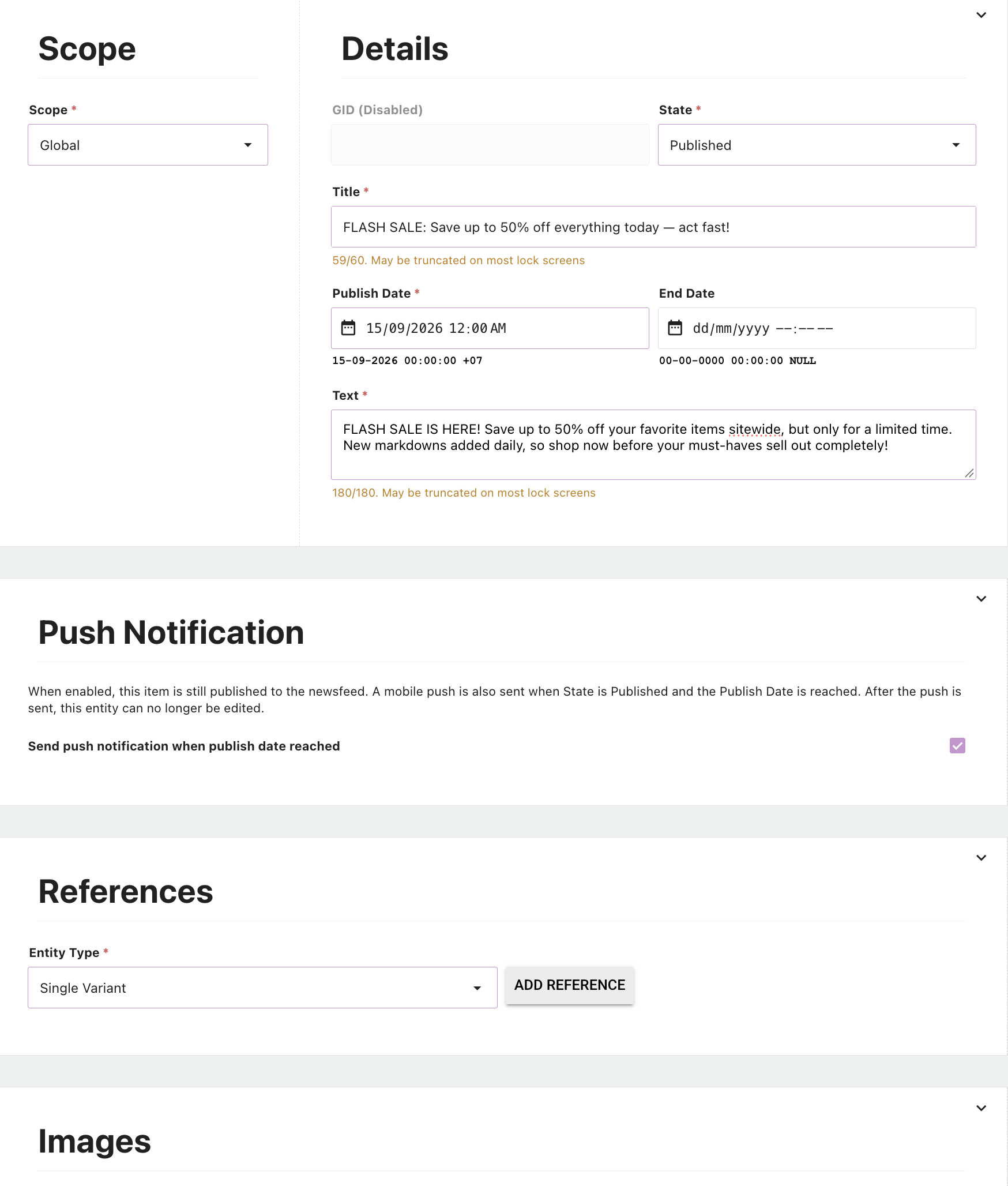
See user guide for additional details
News Feed Templates
News Feed Templates are news feed notifications reflecting a customer’s order status that will now be sent as push notifications. There are no set up steps or configuration required for this feature.
See user guide for additional details